Front counter
Check cashing software built for the front counter
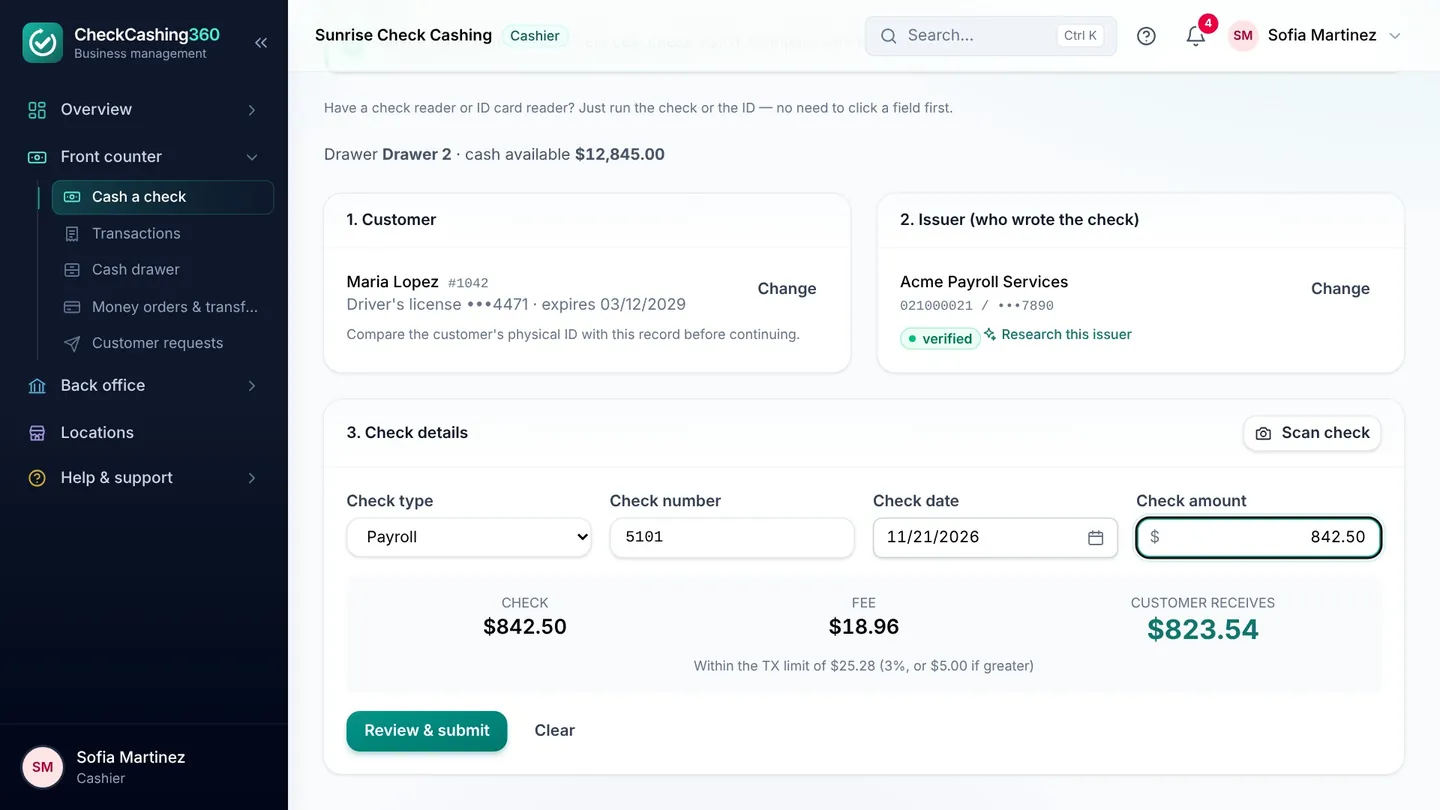
A guided check-cashing screen that quotes the right fee, keeps it within your state’s limit, stops duplicate and known-bad checks, and sends risky checks to a supervisor before any cash leaves the drawer.
What you get
Instant fee quotes
Fees come from your fee schedule by location and check type, with amount tiers, minimums and flat fees. The customer sees the fee and the cash they receive before you pay out.
State fee limits
Every fee is compared with your state’s maximum check-cashing fee on file. Over the limit, the check is blocked or flagged for review, depending on the rule.
Duplicate checks blocked
The same check (issuer account, check number and amount) can’t be cashed twice, and a network retry never pays twice. Possible duplicates go to a supervisor.
Approvals that arrive live
Your rules decide which checks need a supervisor: amount limits, personal checks, unverified issuers, possible duplicates, returned-check history or loss flags. Requests appear on the Approvals screen instantly, with a soft sound.
Check readers, ID readers and camera scan
Run a check through a desk check reader or an ID through a card reader and the form fills in. No reader? Scan the license barcode or photograph the check with any phone or webcam.
English or Spanish receipts
Receipts print in the customer’s language with your disclosure, on office paper or 80 mm thermal receipt printers such as Epson and Star.
Know the issuer before you cash
Every check is linked to the company or agency that wrote it, so your team builds a shared history of good and bad issuers.
- A verified issuer list with contact details, sample check photos and a verification history
- AI issuer research: state registration, public phone number, red flags and sources for an unfamiliar company in under a minute
- Loss-prevention flags for bad customers, accounts and checks, highlighted at the counter and sent for approval
- Business checks matched to the customer’s verified companies (DBA)
Cash drawers update by themselves
When the check is paid, the cash leaves the cashier’s own drawer and the transaction is posted to a balanced double-entry ledger. Nothing to re-key at the end of the day.
- Every payout goes through the cashier’s own open drawer
- An optional extra fee at payout, also kept within the state limit
- Mistakes are reversed by an owner or manager with a reason; the original record stays
- Every step in the activity log: who, when and from which location
Questions
Does it work with my check reader and ID scanner?
Yes, if they work in keyboard (USB HID) mode, as most desk check readers and ID card readers can. Run the check or the ID and the form fills in. Image scanners that need their own software aren’t supported, but the camera scan works on any phone or webcam.
Can I set different fees for each location?
Yes. Fee rules can apply to all locations or to one location, for each check type, with percentage, flat and minimum fees and amount tiers.
What happens when a check needs approval?
The cashier submits it and the supervisor team is notified. A supervisor or manager reviews the reasons on the Approvals screen and approves or rejects it with a note; then the cashier pays out or tells the customer. Nobody can approve their own transaction, and approvals can also reach a phone as a push notification.
Can a check be cashed twice by mistake?
No. The same check (issuer account, check number and amount) can’t be cashed twice, and a network retry never pays twice. The database enforces it, so it can’t be skipped.
How it works
Step-by-step guides from our help center:
More features
Cash drawers & deposits
Drawer counts, vault, over/short, sign-off, bank deposits, returned checks and collections.
Learn moreCustomers & portal
Customer profiles, ID scanning and expiry, QR cards, English/Spanish portal, rewards, payment links.
Learn moreCompliance
CTR aggregation, structuring alerts, CTR/SAR cases, CTR worksheet, OFAC, AML program, examiner package.
Learn moreTry check cashing with your own team
Every new business gets a free trial with full features. Want to look around first? The live demo works without an account.